How to Handle Orlando Tolls in a Rental Car

How to Handle Orlando Tolls in a Rental Car
The cheapest way to manage Orlando tolls in a rental car is to use the Visitor Toll Pass at Orlando International Airport (MCO) or link your own SunPass/E-PASS to the rental plate before you drive away. Both options charge only the electronic toll rate with no added service fees. Skip the rental company’s toll program unless one of these three situations applies to you:
- You arrive at a non-MCO pickup location with no access to a Visitor Toll Pass vending machine.
- Your trip is one day or less and the math on a flat daily rental-company fee works out cheaper.
- You are on a multi-day commercial trip and need zero post-rental billing hassle at any cost.
Three things you can do right now, in under two minutes at the counter:
- Reserve a Visitor Toll Pass in the app before you reach the counter, or pick one up at the MCO vending machine near the rental counters.
- Decline the rental company’s toll transponder on your paperwork and take a photo of that screen.
- Open the SunPass or E-PASS app and add the rental vehicle’s license plate to your account before you pull out of the garage.
Key Takeaways
The Visitor Toll Pass at MCO is the lowest-cost, lowest-hassle option for most Orlando rental-car travelers, but plate-linking delays mean you should set up any SunPass or E-PASS link at least 24 hours before pickup.
| Point | Details |
|---|---|
| Best option at MCO | Visitor Toll Pass charges only the electronic toll rate with no service fee; pick up at terminal vending machines. |
| SunPass plate-linking delay | Linking a rental plate can take up to 48 hours; set it up before arrival to avoid Pay-By-Plate invoices. |
| Decline rental program in writing | Record the declined toll program on the rental agreement and photograph the screen at the counter. |
| Monitor post-rental charges | Toll invoices can take two to six weeks to appear; check your card for 30–60 days after return. |
| Myvanrentals for groups | Myvanrentals’ Orlando airport pickup and local team support help group organizers handle toll setup before leaving the garage. |
Table of Contents
- What are your main toll payment options for Orlando rental cars?
- How does the Visitor Toll Pass work at Orlando International Airport?
- How do you use SunPass or E-PASS in a rental vehicle?
- How do rental-company toll programs work, and where do the fees come from?
- What happens if you miss a toll during your rental?
- Your one-minute pre-pickup and drop-off checklist
- Why official timing guidance matters for plate linking
- What most renters get wrong about Orlando tolls
- Myvanrentals makes toll planning easier for Orlando groups
- Sources
- FAQ
What are your main toll payment options for Orlando rental cars?
Most routes between MCO and the theme parks use cashless toll roads such as SR 417 and SR 528. You have four ways to pay.
| Option | Cost (tolls + fees) | Setup time | Coverage | Double-charge risk | Return/cleanup |
|---|---|---|---|---|---|
| Visitor Toll Pass (CFX) | Toll only, electronic rate | 5 min at MCO vending machine | Statewide Florida | Low if you decline rental transponder | Return hangtag to MCO dropbox |
| Own SunPass/E-PASS (plate-linked) | Toll only, electronic rate | 2 min in app; up to 48-hr delay | Statewide Florida | Low after linking completes | Remove plate from account after return |
| Rental-company toll program | Toll + daily convenience fee | Instant at counter | Varies by company | Low | None required |
| Pay-by-plate (no setup) | Toll + rental-company service fee | None | All roads | High; rental company adds fees | None, but invoice arrives later |
Key takeaways from this comparison:
- Visitor Toll Pass and plate-linked SunPass/E-PASS are consistently the lowest-cost options.
- Rental-company programs are the most convenient but often the most expensive for multi-day trips.
- Pay-by-plate is the most expensive outcome and the one you want to avoid entirely.
How does the Visitor Toll Pass work at Orlando International Airport?
The Visitor Toll Pass is a free temporary hangtag program run by the Central Florida Expressway Authority (CFX). It is available exclusively to rental customers who pick up and return at MCO. It charges only the electronic toll rate across all Florida toll roads, with no added service fee.
Step-by-step at the airport:
- Reserve in the app before your flight lands. Download the Visitor Toll Pass app, create an account, and pay the $10 deposit. That deposit applies toward your actual toll charges.
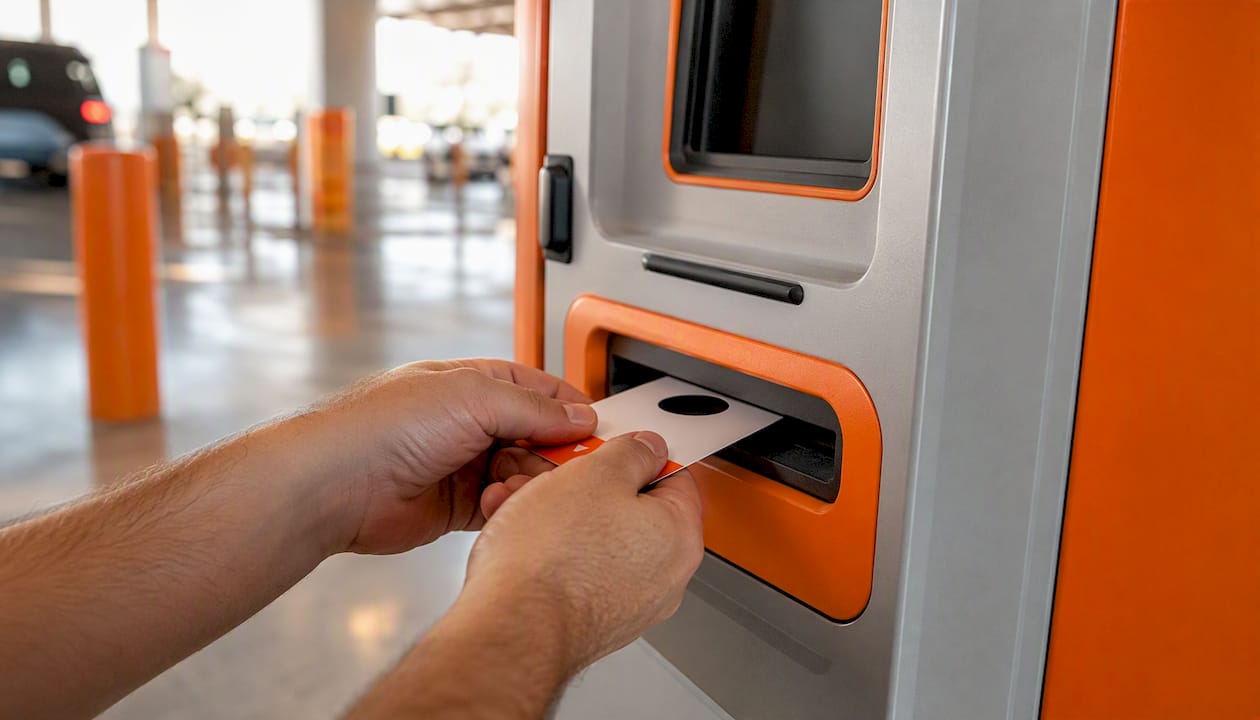
- Pick up the hangtag at a vending machine or dropbox location in MCO Terminals A, B, and C, near the rental car counters. The machine dispenses the physical hangtag.
- Add the rental plate in the app immediately after you get the car. The hangtag reads the plate, and tolls post to your account at the electronic rate.
- Decline the rental company’s transponder on your rental agreement. Having two active transponders in the car creates a double-charge risk.
- Return the hangtag to any MCO dropbox or vending machine at the end of your trip. If you do not return it, CFX charges a non-return fee.
Your remaining deposit balance is refunded after the hangtag is returned and your account settles. Local reporting notes the vending machines are positioned close to the rental counters, so pickup takes only a few minutes.
Pro Tip: Keep a screenshot of your Visitor Toll Pass return confirmation. If a non-return fee appears later, that screenshot is your fastest path to a refund.
How do you use SunPass or E-PASS in a rental vehicle?
Linking a rental vehicle’s license plate to an active SunPass account lets tolls post directly to your prepaid balance at the lowest electronic rate. The same process works for E-PASS and several compatible out-of-state transponders including E-ZPass, NC Quick Pass, Peach Pass, and I-PASS, though compatibility rules vary, so verify before you travel.
Before you drive away, confirm these items in your SunPass or E-PASS app:
- Account is funded with enough balance for your expected toll usage.
- Rental plate number is entered correctly (double-check against the physical plate).
- Account status shows “active.”
- No second transponder is present in the vehicle.
Timing warning: Adding a rental plate to your account can take up to 48 hours to fully register in the toll system. During that window, tolls may be processed as Pay-By-Plate invoices sent to the rental company, which then bills you with added service fees. Set up the plate link as early as possible, ideally before you arrive at the airport.
If you bring a portable transponder from home, tell the rental company at the counter, mount it on the windshield per the manufacturer’s instructions, and remove it before you return the car. Also remove the rental plate from your account immediately after drop-off. Leaving it linked means future tolls on that plate could post to your account.
How do rental-company toll programs work, and where do the fees come from?
Rental companies typically offer one of three billing models for tolls:
- Daily convenience fee: A flat charge per day for the entire rental period, whether you use a toll road or not.
- Per-use daily fee: A smaller daily fee applied only on days when a toll is recorded.
- Unlimited daily pass: A capped daily rate covering all tolls for that day.
The toll charge itself is often small. The administrative fee layered on top is where costs grow. Rental-company programs can add several dollars per day to what would otherwise be a few cents in electronic tolls.
When you do not enroll in a program and a toll goes unpaid electronically, the toll authority captures your plate, issues a Pay-By-Plate invoice to the rental company (the registered owner), and the rental company pays it, then bills you for the toll plus its own service fee. Pay-By-Plate rates are also higher than electronic rates.
At the counter: Ask the agent to record your declined toll program in the rental agreement. Take a photo of the screen showing the declined status. That photo is your primary evidence if a disputed charge appears after return.
Quick decision checklist before you sign:
- Will you use toll roads more than twice per day? A flat daily program may be worth it.
- Do you have a Visitor Toll Pass or linked SunPass ready? If yes, decline the rental program.
- Is your trip one day or less with no MCO pass access? A single-day rental-company fee may be simpler.
- Are you renting for a week or more? The daily fees compound fast; use Visitor Toll Pass or SunPass instead.
What happens if you miss a toll during your rental?
The invoicing flow works like this: the toll authority captures your plate image, generates a Pay-By-Plate invoice at the higher plate-based rate, and sends it to the rental company. The rental company may pay the invoice immediately, then charge your card on file for the toll amount plus a service fee.
If you see an unexpected toll charge after returning the car:
- Gather your rental agreement, the photo of your declined toll program (if applicable), and your Visitor Toll Pass return confirmation or SunPass account history.
- Contact the rental company’s toll billing department first. Many companies use a third-party toll vendor; the rental agreement or your post-rental email will list the contact.
- If the charge is incorrect, submit your documentation and request a review. Most companies have a 30-day dispute window, though some are shorter.
- If the rental company does not resolve it, contact the toll authority directly with your trip dates and plate number.
- Use a credit card dispute only as a last resort, after the above steps fail.
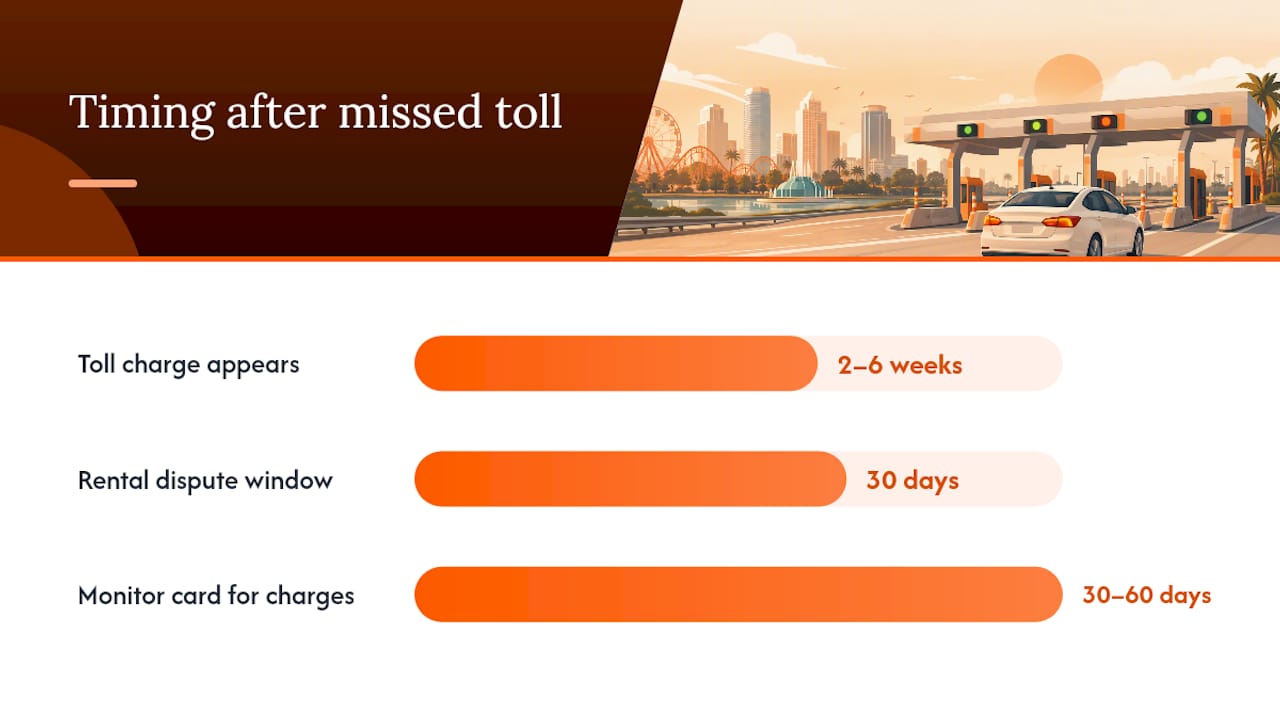
Charges from missed tolls can take two to six weeks to appear on your statement. Monitor your card for 30–60 days after returning the car.
Your one-minute pre-pickup and drop-off checklist
At pickup:
- Confirm your toll option choice is recorded on the rental agreement.
- Write down or photograph the rental vehicle’s license plate number.
- Check whether a transponder is already mounted in the car; if you declined the rental program, ask for it to be removed.
- Confirm your Visitor Toll Pass hangtag is activated and the plate is added, or verify your SunPass/E-PASS plate link is active.
During the trip:
- Use only one active payment method. Do not run both a Visitor Toll Pass and a linked SunPass simultaneously.
- Check your Visitor Toll Pass app or SunPass balance mid-trip if you are driving heavily tolled routes.
At drop-off:
- Remove any portable transponder you brought from home.
- Return the Visitor Toll Pass hangtag to an MCO dropbox or vending machine before leaving the airport.
- Take a photo of the rental return paperwork.
- Remove the rental plate from your SunPass or E-PASS account the same day.
Pro Tip: For groups using a 15-passenger van or larger vehicle, assign one person as the toll manager before the trip starts. That person handles the app, monitors balances, keeps all receipts, and manages the hangtag return. One point of contact prevents confusion at drop-off.
Why official timing guidance matters for plate linking
The CFX FAQ and SunPass rental vehicle guidance both confirm that plate linking is not instantaneous.
- SunPass states that adding a rental plate allows tolls to post to your prepaid account at the electronic rate, but the link may take time to propagate across toll readers.
- CFX notes the delay can be up to 48 hours, during which the system may not recognize the plate as linked to a transponder account.
- During that window, toll readers may generate Pay-By-Plate invoices to the rental company rather than charging your account.
Practical implication: If you add your rental plate to SunPass or E-PASS the morning of pickup, your first few toll transactions may still generate invoices. Adding the plate the night before pickup, or using the Visitor Toll Pass hangtag from the moment you leave the garage, eliminates that gap.
FDOT’s managed lanes information confirms that Florida’s statewide toll interoperability means a properly linked account or valid hangtag will work across all major toll roads, including express lanes. The risk is entirely in the setup timing, not in coverage.
What most renters get wrong about Orlando tolls
The biggest mistake is assuming the rental company’s toll program is a safety net. It is not. It is a fee-generating product. Renters who sign up “just in case” and then drive toll roads every day often pay far more than the actual toll amounts.
The second most common error is forgetting to return the Visitor Toll Pass hangtag. The hangtag return is the step that triggers your deposit refund and closes the account cleanly. Skipping it costs you the deposit and may generate a non-return fee on top.
A short trip with no MCO pass access is the one case where a rental-company program is genuinely reasonable. If you are renting from a downtown location, driving for a single afternoon, and have no SunPass account, the flat daily fee may be simpler than setting up a new account. That is the exception, not the rule.
Myvanrentals makes toll planning easier for Orlando groups
Group trips to Orlando mean more passengers, more luggage, and more decisions at the rental counter. Myvanrentals offers Orlando van rentals with airport pickup and city-specific team support, so your group arrives with a vehicle that fits and a local contact who knows the routes.
For church groups, school trips, and family reunions, having a single point of contact for pre-trip questions, including toll setup guidance for your specific vehicle and route, removes the guesswork at the counter. Myvanrentals’ Orlando team can walk your group organizer through the Visitor Toll Pass pickup process and confirm the plate number before you leave the garage.
Reserve your Orlando van and ask about toll-ready pickup when you book.
Sources
The rules and fees for Orlando toll roads can change. Check these official sources before your trip:
- SunPass — Rental Vehicles
- CFX — Frequently Asked Questions
- Visitor Toll Pass — Official site
- ClickOrlando — Tourists, visitors, family, friends: Save money on your next MCO car rental
Note: Toll rates, deposit amounts, and program availability can be updated by the toll authority at any time. Always confirm current details directly on the official CFX and SunPass sites before your trip.
FAQ
How do you pay tolls in Orlando with a rental car?
The two best methods are the Visitor Toll Pass hangtag (available at MCO vending machines) and linking your rental plate to an existing SunPass or E-PASS account. Both charge only the electronic toll rate with no added service fees.
What happens if you go through a toll in Florida in a rental car without paying?
The toll authority issues a Pay-By-Plate invoice to the rental company at the higher plate-based rate. The rental company then charges your card for the toll plus its own service fee, which can significantly exceed the original toll amount.
How much do tolls cost in Florida for rental cars?
Electronic toll rates vary by road and distance, but the real cost difference comes from fees. Rental-company toll programs add daily convenience fees on top of the toll itself. Pay-by-plate charges a higher base rate than the electronic rate, plus the rental company’s service fee. Using Visitor Toll Pass or a linked SunPass account keeps you at the lowest electronic rate with no added fees.
Can you use your own SunPass transponder in a rental car?
Yes. Mount it on the windshield, inform the rental company, and remove it before returning the vehicle. Also remove the rental plate from your account after drop-off to prevent future charges from posting to your balance.